
MyAadhaar Portal (myaadhar.uidai.gov.in): Complete Guide to Managing Your Aadhaar Online
MyAadhaar Portal (myaadhar.uidai.gov.in): Complete Guide to Managing Your Aadhaar Online
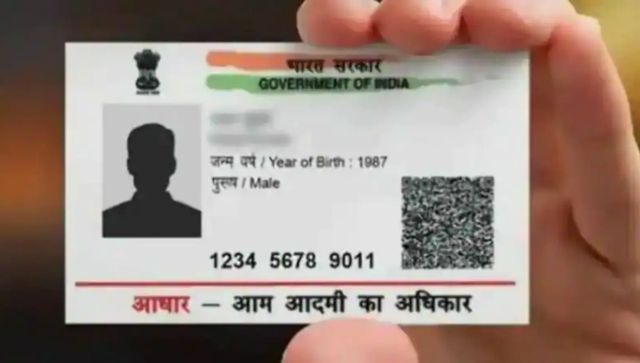)
Introduction
The MyAadhaar portal (myaadhar.uidai.gov.in) is the official online platform developed by the Unique Identification Authority of India (UIDAI) that allows citizens to access and manage their Aadhaar details digitally. As Aadhaar becomes increasingly central to accessing government services, financial transactions, and identity verification, the MyAadhaar portal provides a convenient way to handle all Aadhaar-related services without visiting physical enrollment centers. This comprehensive guide explains everything you need to know about the MyAadhaar portal, from account creation to utilizing its many services.
What is the MyAadhaar Portal?
MyAadhaar portal (myaadhar.uidai.gov.in) is UIDAI’s official web platform that enables Aadhaar cardholders to access various Aadhaar services online. The portal serves as a centralized digital hub for managing your Aadhaar identity, updating your information, downloading your Aadhaar card, and accessing a range of other services related to your unique identification number.
The portal was developed as part of the Digital India initiative to simplify Aadhaar management and reduce the need for citizens to visit physical centers for routine Aadhaar services. Whether you need to update your address, check your Aadhaar authentication history, or download your digital Aadhaar card, the MyAadhaar portal provides secure, convenient access to these services.
Key Features and Services Available on MyAadhaar Portal
1. Aadhaar Enrollment Services
- Check Enrollment Status: Track the status of your Aadhaar application after enrollment
- Download Enrollment/Update Acknowledgment Slip: Retrieve the acknowledgment slip for recent enrollments or update requests
- Book an Appointment: Schedule visits to Aadhaar enrollment centers
2. Update Aadhaar Details
- Online Demographics Update: Modify personal information such as name, address, date of birth, gender, mobile number, and email ID
- Update Request Status: Check the status of previously submitted update requests
- Address Update via Address Validation Letter: Request address validation through a postal service
3. Aadhaar Download Services
- Download Aadhaar: Get your digital Aadhaar card in PDF format
- Order Aadhaar PVC Card: Request for a physical PVC Aadhaar card to be delivered to your address
- Retrieve Lost or Forgotten UID/EID: Recover your Aadhaar number or Enrollment ID using registered mobile number
4. Aadhaar Verification Services
- Verify Aadhaar Number: Check if an Aadhaar number is valid
- Verify Email/Mobile Number: Confirm if your contact details are correctly registered with your Aadhaar
- Verify Aadhaar through QR Code Scanner: Validate Aadhaar details using the secure QR code
5. Security Features
- Lock/Unlock Biometrics: Temporarily disable biometric authentication for security
- Lock/Unlock Aadhaar: Prevent unauthorized use of your Aadhaar number
- Check Authentication History: Review when and where your Aadhaar was used for verification
- Virtual ID Generation: Create a temporary, revocable ID that can be used instead of sharing your actual Aadhaar number
6. Complaint and Feedback Mechanisms
- Register Complaints: File grievances related to Aadhaar services
- Track Complaint Status: Monitor the resolution progress of submitted complaints
- Provide Feedback: Share your experience with UIDAI services
How to Create a MyAadhaar Account
Prerequisites for Registration
Before creating your MyAadhaar account, ensure you have:
- A valid Aadhaar number
- Registered mobile number with your Aadhaar
- Access to the registered mobile for OTP verification
- Valid email ID (optional but recommended)
Step-by-Step Registration Process
- Visit the Official Portal: Navigate to myaadhar.uidai.gov.in using any web browser
- Click on “Login” or “Register”: Look for the registration option on the homepage
- Enter Your Aadhaar Number: Input your 12-digit Aadhaar number in the provided field
- Complete Security Verification: Solve the captcha to proceed
- Receive OTP: An OTP will be sent to your registered mobile number
- Enter the OTP: Input the received OTP in the designated field
- Create Username and Password: Set up your login credentials for future access
- Complete Profile Setup: Add additional details as prompted
- Account Activation: Your MyAadhaar account is now ready to use
Navigating the MyAadhaar Dashboard
Once logged in, the MyAadhaar dashboard offers an intuitive interface with clear sections for different services:
Main Dashboard Elements
- Profile Section: Displays your basic Aadhaar details and profile status
- Services Menu: Lists all available Aadhaar services categorized by type
- Quick Links: Provides direct access to frequently used services
- Notifications: Shows important updates or pending actions
- Recent Activities: Lists your recent interactions with Aadhaar services
User Interface Tips
- Use the search functionality to quickly find specific services
- Bookmark frequently used services for faster access
- Enable notifications to stay updated on service requests
- Check the help section for detailed guides on specific processes
How to Update Aadhaar Details Online
Types of Updates Available Online
The MyAadhaar portal allows you to update various demographic details:
- Name
- Address
- Date of Birth
- Gender
- Mobile Number
- Email ID
- Language Preference
Document Requirements for Different Updates
Depending on the information you’re updating, you’ll need to provide different supporting documents:
For Name Update:
- Marriage certificate
- Gazette notification
- Legal name change certificate
For Address Update:
- Utility bills (electricity, water, gas)
- Bank statements
- Passport
- Driving license
- Voter ID
For Date of Birth Update:
- Birth certificate
- School leaving certificate
- Passport
For Gender Update:
- Self-declaration
- Medical certificate (for transgender individuals)
Step-by-Step Address Update Process
- Login to MyAadhaar: Access your account using your credentials
- Select Update Aadhaar: Choose the “Update Aadhaar” option from the services menu
- Choose Update Type: Select “Address” from the available update options
- Enter New Address: Fill in your complete new address details
- Upload Supporting Documents: Attach scanned copies of address proof documents
- Submit Request: Review the details and submit your update request
- Note Update Request Number (URN): Save this number for tracking your request
- Track Status: Monitor the progress of your update request using the URN
Alternative Update Methods
If you prefer not to use the online portal, you can also update your Aadhaar through:
- Aadhaar Enrollment Centers: Visit any center with supporting documents
- Postal Service: Send a request form with attested documents
- mAadhaar Mobile App: Update certain details through the official mobile application
Downloading Your Aadhaar Card
Different Download Options
The MyAadhaar portal offers multiple ways to download your Aadhaar:
- PDF Download: Standard digital format with password protection
- XML Download: Machine-readable format for system integration
- Masked Aadhaar: Version with the first 8 digits of your Aadhaar number hidden for enhanced privacy
Step-by-Step Download Process
- Login to MyAadhaar: Access your account with your credentials
- Select Download Aadhaar: Choose this option from the services menu
- Verify Your Identity: Complete the verification process (OTP or other methods)
- Choose Download Format: Select your preferred format (PDF, XML, or masked)
- Enter Password: The default password is typically a combination of your PIN code and year of birth (PINCODEYYYY)
- Download and Save: Store the file securely on your device
Security Best Practices for Downloaded Aadhaar
- Always store your digital Aadhaar in a password-protected folder
- Never share the PDF password with unauthorized individuals
- Use the masked Aadhaar whenever possible to protect your full Aadhaar number
- Regularly check your authentication history to monitor usage
- Delete Aadhaar copies from public or shared computers after use
Ordering Aadhaar PVC Card
Benefits of PVC Aadhaar Card
The PVC (Polyvinyl Chloride) Aadhaar card offers several advantages:
- More durable than paper-printed Aadhaar
- Wallet-sized for convenient carrying
- Contains security features to prevent forgery
- QR code for easy digital verification
- Water-resistant and tamper-evident
Ordering Process
- Login to MyAadhaar: Access your account using your credentials
- Select Order Aadhaar PVC Card: Choose this option from the services menu
- Verify Aadhaar Details: Confirm that your information is correct
- Make Payment: Pay the processing fee (currently Rs. 50) using available payment methods
- Confirm Delivery Address: Verify the address where you want the card delivered
- Submit Request: Complete the order process
- Track Status: Monitor the delivery status using the provided Service Request Number (SRN)
Tracking Your PVC Card Delivery
- Use the “Track Aadhaar PVC Card Status” option on the portal
- Enter your 14-digit SRN or 28-digit Aadhaar enrollment number
- Check the estimated delivery timeline (typically 5-15 working days)
- Contact customer support if delivery exceeds the expected timeline
Aadhaar Authentication History
Importance of Monitoring Authentication History
Regularly checking your Aadhaar authentication history helps:
- Detect unauthorized usage of your Aadhaar
- Identify potential identity theft attempts
- Maintain awareness of when and where your Aadhaar is being used
- Ensure compliance with data protection guidelines
How to Check Authentication History
- Login to MyAadhaar: Access your account using your credentials
- Select Authentication History: Choose this option from the services menu
- Specify Time Period: Select the date range for which you want to check the history
- View Detailed Report: See when, where, and for what purpose your Aadhaar was used
- Report Suspicious Activity: Flag any unrecognized authentication attempts
Understanding Authentication Types
The history report typically shows different types of authentication:
- Demographic Authentication: Verification using personal details
- Biometric Authentication: Verification using fingerprints, iris, or facial recognition
- OTP Authentication: Verification using one-time passwords
- Virtual ID Authentication: Usage of temporary Virtual ID instead of actual Aadhaar number
Securing Your Aadhaar with Lock/Unlock Features
Biometric Locking
Biometric locking prevents unauthorized biometric authentication:
- Login to MyAadhaar: Access your account using your credentials
- Select Security Settings: Navigate to this section in the menu
- Choose Biometric Lock: Select this option
- Enable Lock: Toggle the switch to enable the lock
- Confirm with OTP: Verify your action with an OTP
Aadhaar Locking
Aadhaar locking prevents your Aadhaar from being used for any authentication:
- Login to MyAadhaar: Access your account using your credentials
- Select Security Settings: Navigate to this section
- Choose Aadhaar Lock: Select this option
- Enable Lock: Toggle the switch to enable the lock
- Confirm with OTP: Verify your action with an OTP
Virtual ID Generation
Virtual ID provides an alternative to sharing your actual Aadhaar number:
- Login to MyAadhaar: Access your account using your credentials
- Select Virtual ID: Choose this option from the security menu
- Generate New VID: Request a new 16-digit virtual ID
- Copy or Download VID: Save your virtual ID for future use
- Use Instead of Aadhaar: Provide this ID when asked for Aadhaar during authentication
Troubleshooting Common Issues on MyAadhaar Portal
Login Problems
If you’re unable to login:
- Ensure you’re using the correct username and password
- Check if your caps lock is enabled
- Try the “Forgot Password” option to reset your credentials
- Verify that your mobile number is still registered with Aadhaar
- Clear browser cache and cookies before retrying
Update Request Failures
If your update request is rejected:
- Check that your supporting documents meet the requirements
- Ensure documents are clearly scanned and legible
- Verify that document file sizes and formats match portal requirements
- Check if there are spelling inconsistencies between documents
- Wait for the mandatory timeframe between update requests (usually 90 days)
Download Issues
If you can’t download your Aadhaar:
- Ensure you have a PDF reader installed
- Check your internet connection stability
- Try using a different browser
- Verify that you’re entering the correct password
- Try downloading during off-peak hours when server load is lower
Payment Failures
If your payment for services fails:
- Check your bank account balance
- Ensure your card details are entered correctly
- Try an alternative payment method
- Wait for a few minutes before retrying the transaction
- Check if your bank has any restrictions on government portal payments
MyAadhaar Portal vs. mAadhaar Mobile App
Key Differences
Understanding the differences helps you choose the right platform for your needs:
MyAadhaar Portal:
- Accessible through any web browser
- Offers the complete range of Aadhaar services
- Better for complex transactions and updates
- Requires internet connection and browser access
- Suitable for detailed document uploads
mAadhaar App:
- Mobile device application requiring installation
- Allows offline access to your Aadhaar
- Offers on-the-go services with simplified interface
- Includes features like QR code scanning
- More convenient for quick verifications and sharing
When to Use Each Platform
Use MyAadhaar Portal when:
- Making comprehensive updates to your Aadhaar
- Uploading supporting documents
- Ordering PVC cards
- Checking detailed authentication history
- Managing security settings
Use mAadhaar App when:
- You need offline access to your Aadhaar
- Performing quick identity verifications
- Sharing your Aadhaar via QR code
- Using location-based services
- Making basic profile updates
Recent Updates and New Features
Latest Enhancements to MyAadhaar Portal
The UIDAI regularly updates the MyAadhaar portal with new features:
- Improved User Interface: More intuitive navigation and responsive design
- Enhanced Security Protocols: Additional layers of protection for sensitive data
- Expanded Service Options: New services added regularly
- Integration with DigiLocker: Seamless connection with national digital document storage
- Multilingual Support: Interface available in multiple Indian languages
Upcoming Features (Announced by UIDAI)
Based on official UIDAI announcements, upcoming features may include:
- Face authentication for easier identity verification
- Integration with more government services
- Advanced analytics dashboard for usage patterns
- Improved accessibility features for differently-abled users
- Enhanced notification system for important updates
Frequently Asked Questions (FAQ)
Q1: Is the MyAadhaar portal free to use?
A: Yes, most services on the MyAadhaar portal are free. However, certain services like ordering a PVC Aadhaar card have nominal fees.
Q2: How often can I update my Aadhaar details?
A: There’s typically a waiting period of 90 days between two update requests for the same field. However, you can update different fields during this waiting period.
Q3: Can I use MyAadhaar portal without a registered mobile number?
A: Most services require a registered mobile number for OTP verification. If your mobile number is not registered, you’ll need to visit an Aadhaar Enrollment Center to update it first.
Q4: Is it safe to download Aadhaar from the MyAadhaar portal?
A: Yes, downloading Aadhaar from the official portal is safe as it uses encrypted connections and password protection for the downloaded files.
Q5: What should I do if I spot unauthorized authentication in my history?
A: Immediately lock your Aadhaar and biometrics using the security features, then report the unauthorized usage through the complaint section on the portal.
Q6: Can I change my registered mobile number online?
A: If your current mobile number is still active, you can update to a new number online. If not, you’ll need to visit an Aadhaar Enrollment Center.
Q7: How long does it take for online updates to reflect in my Aadhaar?
A: Most online updates are processed within 3-5 working days, though some complex changes may take up to 15 days.
Security Best Practices for MyAadhaar Users
Protecting Your Aadhaar Identity
To ensure maximum security for your Aadhaar information:
- Regularly change your MyAadhaar portal password
- Use strong, unique passwords combining letters, numbers, and special characters
- Enable additional security features like biometric locking when not in use
- Review your authentication history monthly
- Use Virtual ID instead of sharing your actual Aadhaar number when possible
- Never share your OTPs or portal credentials with anyone
- Log out from the portal after each session, especially on shared devices
- Keep your registered mobile number and email updated
Recognizing Aadhaar-Related Scams
Be vigilant against common scams targeting Aadhaar users:
- Fake websites mimicking the official portal
- Phishing emails requesting Aadhaar details
- Fraudulent calls claiming to be from UIDAI
- Messages threatening Aadhaar deactivation
- Requests to share OTPs for “verification”
- Apps claiming to provide Aadhaar services outside official channels
Remember that UIDAI never calls asking for your Aadhaar details or OTPs. Always verify communications by contacting official UIDAI helpline numbers.
Conclusion
The MyAadhaar portal (myaadhar.uidai.gov.in) represents a significant advancement in how citizens manage their identity information in the digital age. By providing a comprehensive suite of services accessible from anywhere with internet connectivity, the portal has revolutionized Aadhaar management, making it more convenient, secure, and efficient.
As Aadhaar continues to play an increasingly important role in accessing government services, financial systems, and identity verification, the MyAadhaar portal serves as a critical tool for citizens to maintain control over their Aadhaar information. By understanding how to effectively use the portal’s features and following security best practices, you can maximize the benefits of your Aadhaar while minimizing potential risks.
Whether you need to update your address, download your digital Aadhaar, order a PVC card, or check your authentication history, the MyAadhaar portal provides a user-friendly platform designed to meet all your Aadhaar-related needs. As UIDAI continues to enhance the portal with new features and improvements, the MyAadhaar experience will only become more streamlined and comprehensive in the future.
Important Contact Information
For further assistance with MyAadhaar portal services:
- UIDAI Toll-Free Helpline: 1947 (24×7)
- Email Support: [email protected]
- Regional UIDAI Offices: Contact details available on the UIDAI website
- Social Media: Official UIDAI accounts on Twitter, Facebook, and YouTube
- Chatbot Assistance: Available on the MyAadhaar portal homepage